💻 Apploye Desktop App – Version 4.4.1
Version 4.4.1 introduces new tracking controls for organizations, several usability enhancements, and important stability fixes to improve the overall tracking experience.
✨ New Features
- ⏱️ Daily Time Limit
Organizations can now set a daily tracking limit for members.- Tracking automatically stops when the limit is reached
- Users cannot start new tracking sessions until the next eligible day
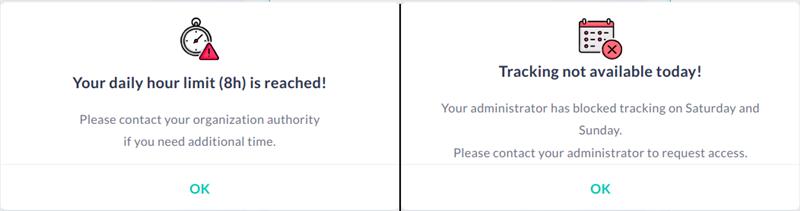
- 📅 Blocked Tracking Days
Organizations can now restrict time tracking on selected weekdays.- Users will be unable to start tracking on blocked days
- Helps enforce organization-specific work schedules and policies
🖌️ UI Updates
- 👤 Improved User Info Popup
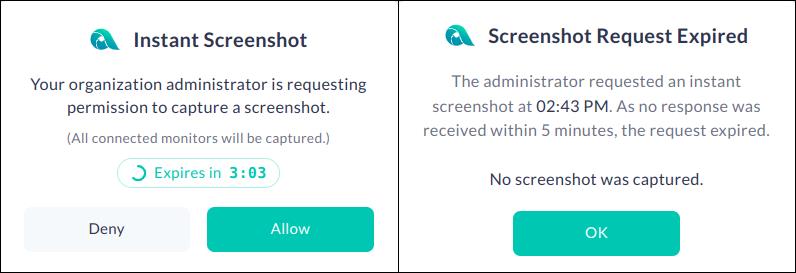
The User Info popup now clearly displays which tracking features are enabled in both active and paused states. - 📸 Instant Screenshot Response Timer
Instant screenshot requests now include a 5-minute response window.- Requests automatically expire if no response is received
- Users are notified when a request expires
- 🔄 Improved Update Checking
The Check for Updates dialog now appears immediately with a loading indicator while update information is being retrieved. - 📋 Quick Version Copy
Added a one-click option to copy the current app version. - 🎨 Refreshed Icons
Updated icons for:- Send Diagnostic Data
- Check for Updates
- 🪟 Better Popup Behavior
Added:- Esc key support
- Click-outside-to-close functionality where applicable
⚒️ Improvements
- 🔐 Code Signing Enhancements
Applied code signing to relevant application files to improve integrity and reliability. - 📂 Project Autofill
If a project is selected in the Project dropdown, it is now automatically pre-filled in the Create Task form when creating a new task. - 📝 Logging Improvements
Added organization name and ID to tracking startup logs and resolved issues that could result in "Projects List Request Failed" errors.
🐞 Bug Fixes
- Screen Records: Fixed an issue where video recordings were prevented when activity tracking was disabled. Also resolved an issue that could create invalid video recording entries on the web when video recording was turned off.
- Pinned Tasks: Fixed an issue where pinned tasks were not placed in the correct list after fetching and were not removed in real time when unassigned or deleted.
- Data Sync: Fixed a sync pipeline deadlock that could prevent tracking data from being uploaded following authentication failures.
- User ID Recovery: Fixed an issue where tracking data could not be uploaded due to a missing user ID. The application now automatically restores the user ID when possible or signs the user out if recovery fails.
- Network Error Handling: Improved handling of network-related errors, including EAI_AGAIN, to prevent unexpected application exits.